If your download link is not working, create a support ticket. We will send you a new working download link when we are back.


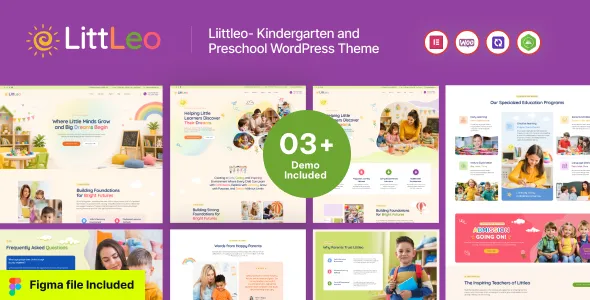
Littleo – Kindergarten & Preschool WordPress Theme is a cheerful and professional WordPress theme designed for kindergartens, preschools, nurseries, daycare centers, early learning institutions, Montessori schools, child development centers, play schools, and educational organizations serving young children. With a friendly visual style and an education-focused structure, Littleo provides a strong online foundation for presenting your school, introducing teachers, showcasing programs, sharing activities, communicating with parents, and providing important information about admissions and daily learning experiences.
For parents, choosing a preschool or kindergarten is an important decision. They want to understand the school’s environment, teaching approach, programs, facilities, staff, activities, schedule, admission process, and values before making contact. Littleo helps educational institutions organize this information into an engaging and easy-to-navigate website that communicates warmth, professionalism, and trust.
Littleo is created specifically around the needs of early childhood education websites. It can be adapted for small neighborhood preschools, established kindergartens, Montessori institutions, daycare centers, nursery schools, and larger early learning organizations.
Use the website to introduce your school, explain your educational philosophy, highlight learning programs, present classrooms, introduce teachers, share children’s activities, publish announcements, and provide parents with useful resources.
A well-organized preschool website should make information easy to find while maintaining a welcoming and child-friendly appearance. Littleo provides a foundation for combining colorful visual content with clear educational information.
Preschools need websites that speak to both parents and children while maintaining a professional identity. Littleo can help create an inviting digital presence that introduces your institution and communicates the experience you provide.
Create dedicated sections for:
Each section can provide useful information for families considering your institution.
A kindergarten website should provide parents with a clear overview of the school’s programs and environment.
Littleo can be used to showcase:
Use photography and informative content to give families a better understanding of what children can experience at your school.
The first impression of an early learning website should feel welcoming. Littleo provides a foundation for using bright imagery, engaging layouts, friendly typography, and carefully organized content to create a positive online experience.
Your homepage can introduce the school’s personality while guiding parents toward the information they need.
Highlight:
Every school may organize its early learning programs differently. Littleo gives you space to explain your programs in detail.
Possible program categories include:
Each program can have its own page with information about age groups, learning activities, schedules, teaching approaches, and enrollment details.
Montessori schools can use Littleo to present their educational philosophy and classroom environment.
Create content explaining:
Use photographs and educational descriptions to help parents understand your school’s approach.
Littleo can also be adapted for daycare centers and nursery programs.
Present important information such as:
Clear content can help parents understand what their children can expect during the day.
Parents often want to see what children actually do at school. Activity pages can make the website more engaging while communicating the school’s learning philosophy.
Showcase activities such as:
Use photographs and short descriptions to explain the purpose of each activity.
Classroom content can help parents visualize the learning environment.
Create sections showing:
Include descriptions explaining how these spaces support the school’s educational activities.
Teachers are an important part of the preschool experience. Parents often want to know who will be caring for and teaching their children.
Littleo can be used to create professional teacher profiles containing:
Introducing teachers helps make the institution feel more personal and transparent.
In addition to teachers, you can introduce school leadership, administrators, coordinators, counselors, activity instructors, and other staff members.
A staff directory can help parents understand the team responsible for operating the school and supporting children.
Your school’s philosophy can be one of the most important parts of the website.
Explain your approach to:
Use this section to clearly communicate what makes your educational environment different.
Parents are the primary audience for most preschool websites. Littleo allows you to create dedicated resources that answer common questions and provide important school information.
Create pages for:
Clear information helps parents find answers without needing to contact the school for every basic question.
Make the admission process easy to understand by creating a dedicated admissions section.
Explain:
If your institution accepts online inquiries or applications, provide a clear form or call-to-action that guides parents toward the next step.
Schools can use the website to promote enrollment periods and upcoming academic sessions.
Create dedicated content for:
Keep dates and availability information updated so families receive accurate information.
Events are an important part of early childhood education. Littleo can provide space for promoting and documenting school events.
Possible events include:
Event pages can include dates, descriptions, photographs, and relevant information for parents.
A school calendar can help parents stay informed about important dates.
Include:
Keeping the calendar updated can make the website a useful communication resource for families.
Parent testimonials can help communicate the experiences of families who have interacted with your school.
Testimonials may discuss:
Use genuine testimonials and appropriate permissions when publishing parent feedback.
A school blog can provide valuable educational content for parents and families.
Publish articles about:
The blog can also be used to share announcements and school updates.
A preschool website can become a useful information resource beyond school administration.
Create parent-focused guides about:
Educational content can strengthen communication between the school and families.
A kindergarten website should feel approachable without sacrificing professionalism.
Use:
The visual presentation should reflect the school’s personality and create a welcoming environment for parents.
Displaying children’s creative work can help communicate the school’s learning environment.
Create galleries for:
Always follow your school’s privacy and parental consent policies when publishing photographs or identifying information about children.
A dedicated gallery can provide a visual tour of the institution.
Showcase:
A well-organized gallery gives parents a better understanding of the school environment before they schedule a visit.
Parents often want to understand the facilities available at a school.
Create dedicated sections for:
Describe facilities accurately and focus on the features that are genuinely available at your institution.
A school website should provide clear and responsible communication.
Use the website to publish official announcements, school policies, contact information, event updates, and parent resources.
Important school information should be easy to find and regularly updated.
Many parents search for educational institutions in their local area. Local SEO can help families discover your school when searching for nearby preschool and kindergarten options.
Create useful content around genuine service locations and phrases such as:
Location-focused content should provide real information about the institution rather than simply repeating keywords.
A well-structured preschool website can attract families who are researching schools online.
Create dedicated pages for:
Regularly publishing useful educational content can also create additional opportunities for search visibility.
Parents may browse your school website from smartphones while traveling, working, or managing family schedules.
A mobile-friendly website makes it easier to:
A consistent experience across desktop and mobile devices can make school information more accessible.
Make it easy for prospective parents to contact your school.
A professional contact page can include:
You can also add a clear call-to-action such as “Schedule a School Visit” or “Contact Admissions.”
Parents often want to visit a preschool before making an enrollment decision.
If your institution provides school tours, create a dedicated section explaining how families can request a visit.
Include information about:
This can create a clear pathway from online research to an in-person school visit.
Littleo can help educational institutions establish a recognizable online identity.
Use consistent school colors, logos, typography, photography, illustrations, and messaging throughout the website.
A consistent brand can help parents remember your institution and create a more professional presentation across your digital channels.
Parents want to understand what an institution stands for.
Create a dedicated section explaining your school’s mission and values.
Discuss areas such as:
Make sure the values reflect your actual educational practices.
Play is an important part of many early childhood learning environments. Schools can use their website to explain how activities support children’s learning and engagement.
Create content around:
Focus on explaining the activities and learning environment rather than making unsupported developmental promises.
If your school publishes curriculum information, Littleo provides a suitable platform for presenting it clearly.
Organize information by:
Clear curriculum information can help parents understand what children will encounter during the school year.
If your school provides meals or structured daily routines, create dedicated information pages.
Parents may want to know about:
Only publish information that reflects your school’s actual policies.
A school website can support communication between the institution and families.
Use announcements, news posts, event pages, calendars, and parent resources to keep families informed.
The website can complement your existing communication channels by providing a central source of official information.
Preschool and kindergarten activities can be visually engaging, making social media useful for sharing school news and approved activity content.
Promote:
Always follow your school’s privacy and parental consent requirements when sharing children’s images or information online.
A detailed FAQ section can answer common questions from parents.
Potential topics include:
This can make the website more useful and reduce repetitive inquiries.
Littleo can support institutions as they grow.
Add new programs, teachers, classrooms, activities, events, blog articles, galleries, and locations as your organization expands.
A flexible website structure allows your online presence to evolve with your educational institution.
Littleo can be adapted for:
The content can be customized to reflect the institution’s actual services and educational model.
The most important goal of a preschool website is to make information easy for parents to understand.
Organize the website around common parent questions:
This structure creates a clear and useful online experience.
Littleo can bring the major elements of an early education website together in one platform.
Your website can include:
Each section can be customized according to your school’s requirements.
A professional website can become the central platform for your preschool’s digital marketing efforts.
Combine your website with:
Marketing campaigns can direct families toward your website, where they can explore your programs and contact the admissions team.
Littleo – Kindergarten & Preschool WordPress Theme provides a welcoming and professional foundation for kindergartens, preschools, nurseries, Montessori schools, daycare centers, play schools, and early learning institutions. Its child-friendly presentation and education-focused structure make it suitable for showcasing programs, teachers, classrooms, activities, events, facilities, admissions information, parent resources, and school news.
Whether you are launching a new preschool website, modernizing an established kindergarten’s online presence, or building a digital platform for a growing early learning center, Littleo can help organize your school’s information into a clear and engaging experience for families.
Showcase your classrooms, introduce your teachers, explain your educational philosophy, highlight children’s activities, provide admission information, publish helpful resources, and make it easy for parents to contact your institution. With strong visual storytelling, useful content, local SEO opportunities, mobile-friendly presentation, and a parent-focused structure, Littleo can provide a valuable online foundation for building a professional and welcoming preschool or kindergarten website.
All digital products are the most recent version at the time of purchase, with no possibility of free updates beyond the initial purchase.
After payment, we will upload the product file within 24 to 48 hours and most of time under 12 hour.
From multipurpose themes to niche templates